Animated Art
Five animations that showcase what's possible when you combine PyFreeform's animation system with parametric curves, fractals, and algorithmic geometry. Every SVG below is pure SMIL — open in a browser to watch it play.
Browser preview
Animated SVGs play in web browsers. They won't animate in image viewers or editors like Inkscape.
Mandelbrot Set
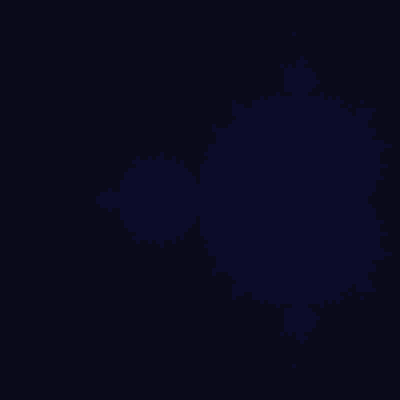
The Mandelbrot set revealed iteration by iteration on a 100×100 grid. Each cell maps to a point on the complex plane, colored by escape iteration. The set assembles band-by-band, holds, then dissolves in reverse — looping forever:
from pyfreeform import Scene
from pyfreeform.color import hsl

cols, rows = 100, 100
scene = Scene.with_grid(cols=cols, rows=rows, cell_size=4, background="#0a0a1a")
max_iter = 50

# Map the grid to the complex plane: x ∈ [-2, 0.5], y ∈ [-1.25, 1.25]
x_min, x_max = -2.0, 0.5
y_min, y_max = -1.25, 1.25

by_iter = {}
for row in range(rows):
    for col in range(cols):
        cell = scene.grid[row][col]
        cx = x_min + (col + 0.5) / cols * (x_max - x_min)
        cy = y_min + (row + 0.5) / rows * (y_max - y_min)
        c = complex(cx, cy)

        z = 0 + 0j
        escape = max_iter
        for i in range(max_iter):
            z = z * z + c
            if z.real * z.real + z.imag * z.imag > 4:
                escape = i
                break

        if escape == max_iter:
            cell.add_fill(color="#0c0c2a")   # inside the set
            continue

        t = escape / max_iter
        color = hsl((240 + t * 300) % 360, 0.85, 0.35 + 0.3 * t)
        fill = cell.add_fill(color=color, opacity=0.0)
        by_iter.setdefault(escape, []).append(fill)

# Fade each escape-band in turn, then bounce the whole reveal and loop forever
delay = 0.0
band_delays = []
for i in sorted(by_iter):
    band_delays.append((delay, by_iter[i]))
    delay += 0.06
forward_time = delay + 0.5

for appear, fills in band_delays:
    for fill in fills:
        fill.animate_fade(
            keyframes={0: 0, appear: 0, appear + 0.4: 1.0, forward_time: 1.0},
            repeat=True, bounce=True,
        )
The Mandelbrot set
For each point c in the complex plane, iterate z → z² + c starting from z = 0. If z stays bounded, c is in the set. The boundary between "escapes" and "stays" is infinitely detailed — zoom in anywhere on the edge and you'll find miniature copies of the whole set.
Lissajous Harmonograph
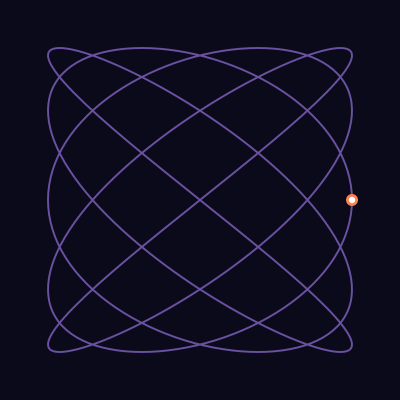
A dot traces a Lissajous curve in real time while the path draws itself behind it. The frequency ratio a=5, b=4 creates an intricate closed knot:
import math
from pyfreeform import Scene
from pyfreeform.paths import Lissajous

scene = Scene.with_grid(cols=1, rows=1, cell_size=400, background="#0a0a1a")
cell = scene.grid[0][0]

liss = Lissajous(center=(0.5, 0.5), a=5, b=4, delta=math.pi / 2, size=0.38)

# The curve draws itself (relative=True scales 0–1 coords to pixels)
path = cell.add_path(liss, relative=True, width=2, color="mediumpurple", opacity=0.7)
path.animate_draw(duration=6.0, easing="linear")

# liss.point_at(0.0) is already in relative (0–1) space
start = liss.point_at(0.0)

# A dot follows the same curve
tracer = cell.add_dot(at=(start.x, start.y), radius=0.015, color="coral")
tracer.animate_follow(path, duration=6.0, easing="linear", repeat=True)

# Glowing center — pulse radius only
glow = cell.add_dot(at=(start.x, start.y), radius=0.008, color="white")
glow.animate_follow(path, duration=6.0, easing="linear", repeat=True)
glow.animate_radius(to=8, duration=0.8, easing="ease-in-out", bounce=True, repeat=True)
Lissajous curves
A Lissajous figure is defined by x = sin(a·t + δ), y = sin(b·t). When the frequency ratio a/b is rational, the curve closes. Different ratios produce wildly different patterns — try a=3, b=2 for a figure-eight, or a=7, b=5 for a complex star-knot.
Spiral Galaxy
Stars bloom outward in golden-angle phyllotaxis order. Each star fades in with staggered timing, recreating the way a spiral galaxy's arms emerge:
import math
from pyfreeform import Scene, Polygon, stagger
from pyfreeform.color import hsl

scene = Scene.with_grid(cols=1, rows=1, cell_size=440, background="#050510")
cell = scene.grid[0][0]
golden_angle = 137.508
max_r = 0.44  # relative radius within the cell

stars = []
for i in range(1, 201):
    angle = math.radians(i * golden_angle)
    t = i / 200
    r = max_r * math.sqrt(t)
    rx = 0.5 + r * math.cos(angle)
    ry = 0.5 + r * math.sin(angle)

    hue = (40 - t * 220) % 360
    star_size = 0.015 + 0.025 * (1 - t)  # inner stars larger
    star = cell.add_polygon(Polygon.star(size=star_size, center=(rx, ry)),
                            fill=hsl(hue, 0.85, 0.55), opacity=0.0)
    stars.append(star)

# Stagger: each star fades in with offset timing
stagger(*stars, offset=0.02,
        each=lambda d: d.animate_fade(to=0.9, duration=0.5, easing="ease-out"))

# Some stars spin for a twinkling effect
for i, star in enumerate(stars):
    if i % 5 == 0:
        star.animate_spin(360, duration=8.0 + (i % 3) * 2, easing="linear", repeat=True)

The golden angle
The golden angle (137.508°) is 360° / φ² where φ is the golden ratio. Placing points at successive golden angles produces the most uniform distribution possible — no two arms ever align, creating the natural spiral patterns found throughout nature.
Breathing Mandala
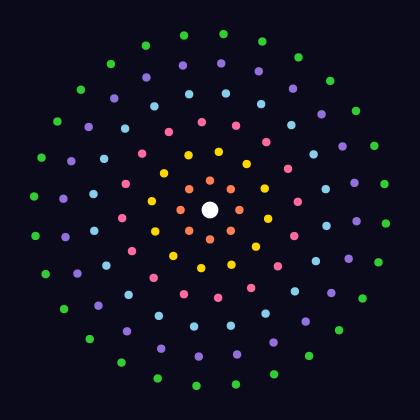
Concentric rings of dots pulse in and out with phase offsets, creating a hypnotic breathing pattern. Each ring starts its cycle slightly after the previous one:
import math
from pyfreeform import Scene

scene = Scene.with_grid(cols=1, rows=1, cell_size=420, background="#0a0a1a")
cell = scene.grid[0][0]

n_rings = 6
dots_per_ring = [8, 12, 16, 20, 24, 28]
ring_colors = ["coral", "gold", "#ff6b9d", "skyblue", "mediumpurple", "limegreen"]

for ring_idx in range(n_rings):
    n = dots_per_ring[ring_idx]
    r = 0.07 + ring_idx * 0.07  # relative radius from center
    color = ring_colors[ring_idx]
    phase_delay = ring_idx * 0.3

    for j in range(n):
        angle = 2 * math.pi * j / n + ring_idx * 0.15
        rx = 0.5 + r * math.cos(angle)
        ry = 0.5 + r * math.sin(angle)
        dot = cell.add_dot(at=(rx, ry), radius=0.01, color=color)

        per_dot_delay = phase_delay + j * 0.05
        dot.animate_radius(to=10, duration=2.0, delay=per_dot_delay,
                           easing="ease-in-out", bounce=True, repeat=True)
        if j % 2 == 0:
            dot.animate_fade(to=0.3, duration=2.0, delay=per_dot_delay,
                             easing="ease-in-out", bounce=True, repeat=True)

# Center jewel
center = cell.add_dot(at=(0.5, 0.5), radius=0.02, color="white")
center.animate_radius(to=16, duration=1.5, easing="ease-in-out", bounce=True, repeat=True)
center.animate_spin(360, duration=6.0, easing="linear", bounce=True, repeat=True)
Sierpinski Triangle
A Sierpinski triangle that cuts itself out depth by depth. A solid triangle appears first, then progressively smaller center holes are punched out to reveal the fractal:
from pyfreeform import Scene

bg = "#0a0a1a"
scene = Scene.with_grid(cols=1, rows=1, cell_size=420, background=bg)
cell = scene.grid[0][0]
max_depth = 5

margin = 0.08
top = (0.5, margin)
bl = (margin, 1.0 - margin)
br = (1.0 - margin, 1.0 - margin)

def midpoint(a, b):
    return ((a[0] + b[0]) / 2, (a[1] + b[1]) / 2)

# (entity, appear_time, target_opacity, fade_duration)
outer = cell.add_polygon([top, bl, br], fill="#ff6b6b", stroke="#ff6b6b",
                         stroke_width=0.5, opacity=0.0)
elements = [(outer, 0.0, 0.85, 0.6)]

# Punch progressively smaller center holes, depth by depth
corners = [(top, bl, br)]
total_delay = 0.8
for d in range(1, max_depth + 1):
    holes, next_corners = [], []
    for v0, v1, v2 in corners:
        m01, m12, m02 = midpoint(v0, v1), midpoint(v1, v2), midpoint(v0, v2)
        holes.append((m01, m12, m02))
        next_corners.extend([(v0, m01, m02), (m01, v1, m12), (m02, m12, v2)])
    corners = next_corners
    per_hole = min(0.04, 1.2 / max(len(holes), 1))
    for k, (h0, h1, h2) in enumerate(holes):
        hole = cell.add_polygon([h0, h1, h2], fill=bg, stroke=bg, stroke_width=0.3, opacity=0.0)
        elements.append((hole, total_delay + k * per_hole, 1.0, 0.3))
    total_delay += 1.2 + 0.3

# Build forward, hold, then bounce the whole sequence in reverse — forever
forward_time = total_delay + 0.5
for entity, appear, target, dur in elements:
    entity.animate_fade(
        keyframes={0: 0, appear: 0, appear + dur: target, forward_time: target},
        repeat=True, bounce=True,
    )

Sierpinski's triangle
The Sierpinski triangle is one of the simplest fractals: start with a triangle, remove the center, and repeat on each remaining sub-triangle. After n iterations you have 3n triangles, each at 1/2 the scale. The total area shrinks to zero while the structure retains infinite detail — a hallmark of fractal geometry.
What's Next?
These recipes barely scratch the surface. Try combining techniques:
- Lissajous + color keyframes: Animate fill color as a dot traces the curve
- Galaxy + connections: Connect nearby stars with self-drawing connections
- Mandala + .then(): Sequentially build each ring, then start the breathing animation
- Mandelbrot + zoom: Animate into the boundary by narrowing the complex-plane window each frame